
Introduction
I started this project to help me remember a bunch of Chaturbate GIF Animation image codes.
I needed some way to quickly access all the GIF codes so I created a web-based GIF Library application.
Using the GIF Library is simple. Just click on any GIF animation in the library and the Chaturbate GIF code will be copied to the computer clipboard ready to paste into your chat text. You do not need to manually copy the GIF codes.
There is a built-in ClipBook Utility with 80 Text Fields. Each Text Field can be copied to the clipboard with a single click.
The text fields can contain whatever you want - GIF Codes, Moderator Warnings, Emojis, Tip Menus etc.
Page Layout Change Notice:
Each section in the GIF Library is now shown seperately below the Control Panel rather than having all the GIFs on one large page. Now when you click any of the section links that section is will be shown alone below the Control Panel. Hopefully this will have a better user experience as only the GIFs in the selected section will need to be loaded.
If this is your first visit here PLEASE keep reading this page!
This will help you understand how to use the GIF Animation Library and the ClipBook Utility.
The GIF Animation Library was designed to be usable on screen sizes 1366 x 768 and upwards.
I started this project to help me remember a bunch of Chaturbate GIF Animation image codes.
I needed some way to quickly access all the GIF codes so I created a web-based GIF Library application.
Using the GIF Library is simple. Just click on any GIF animation in the library and the Chaturbate GIF code will be copied to the computer clipboard ready to paste into your chat text. You do not need to manually copy the GIF codes.
There is a built-in ClipBook Utility with 80 Text Fields. Each Text Field can be copied to the clipboard with a single click.
The text fields can contain whatever you want - GIF Codes, Moderator Warnings, Emojis, Tip Menus etc.
Page Layout Change Notice:
Each section in the GIF Library is now shown seperately below the Control Panel rather than having all the GIFs on one large page. Now when you click any of the section links that section is will be shown alone below the Control Panel. Hopefully this will have a better user experience as only the GIFs in the selected section will need to be loaded.
If this is your first visit here PLEASE keep reading this page!
This will help you understand how to use the GIF Animation Library and the ClipBook Utility.
The GIF Animation Library was designed to be usable on screen sizes 1366 x 768 and upwards.
GIF Animation Page Overview
A partial screenshot of the GIF Animation Page is shown below.
Control Panel:
At the very top of the screen is the Control Panel. The Control Panel floats over the page contents so it is always in view no matter where you scroll the page. It can be set to float at the top or the bottom of the screen.
The Control Panel functions are numbered in the screenshot below and explained in detail:
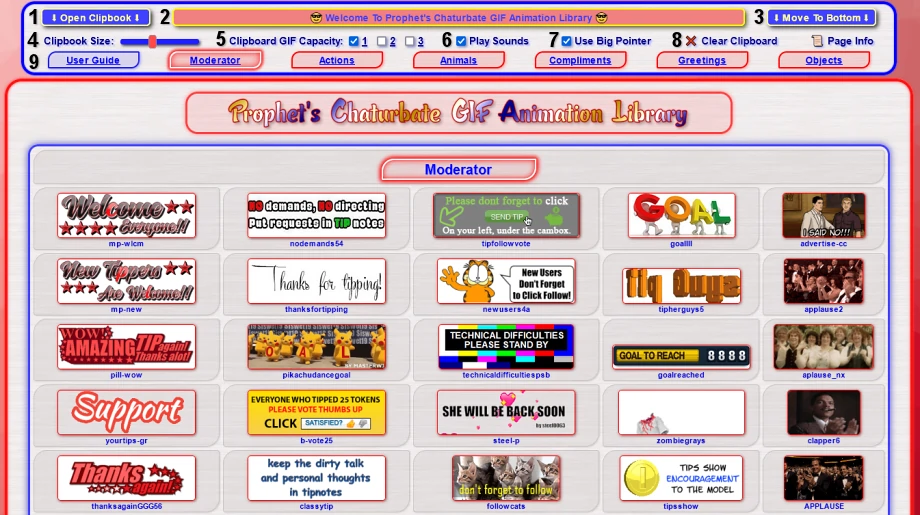
Control Panel Functions:
1. Opens and closes the Clipbook Utility. More information about the Clipbook is further down this page.
2. Clipboard Indicator. Shows the GIF code(s) and / or Clipbook Text that was recently copied to the clipboard.
3. Control Panel Position Selector. Click this to place the Control Panel either at Top or Bottom of the page.
4. Clipbook Window Size. This slider sets the Clipbook vertical window size.
5. Clipboard GIF Capacity. Allows 1, 2 or 3 GIF codes on the clipboard at one time. Use NumPad 1, 2, 3 as shortcut keys.
6. Play Page Event Sounds. Select either On or Off.
7. Mouse Pointer selector. You can select the standard browser pointer or use a more visible larger pointer.
8. Clears the Computer Clipboard and shows the initial greeting in the Clipboard Indicator box.
9. Control Panel Links that take you to the User Guide (this page) or to each section on the GIF Animation Library Page.
Clipboard GIF Capacity Info:
Chaturbate allows up to three GIF images to be used in a line of chat text. Any additional GIF codes are ignored.
If the room broadcaster is running a BOT that automatically adds GIF image codes to your chat text then those GIF images count toward the total of the three GIFs allowed.
You can use the Clipboard GIF Capacity setting as a reminder of any GIF limit the room may have. The default setting is 1.
The NumPad Keys 1, 2, 3 can also be used as shortcuts to setting the Clipboard GIF Capacity.
When the Clipboard GIF Capacity is changed the Clipboard Indicator is cleared.
The Mouse Pointer will indicate the current Clipboard GIF Capacity setting by displaying 1, 2, or 3 green dots in the pointer tail.
 Clipboard Capacity Setting: 1x GIF
 Clipboard Capacity Setting: 2x GIFs
 Clipboard Capacity Setting: 3x GIFs
Note: The Use Big Pointer option has to be enabled for this indicator to work.
A partial screenshot of the GIF Animation Page is shown below.
Control Panel:
At the very top of the screen is the Control Panel. The Control Panel floats over the page contents so it is always in view no matter where you scroll the page. It can be set to float at the top or the bottom of the screen.
The Control Panel functions are numbered in the screenshot below and explained in detail:
Control Panel Functions:
1. Opens and closes the Clipbook Utility. More information about the Clipbook is further down this page.
2. Clipboard Indicator. Shows the GIF code(s) and / or Clipbook Text that was recently copied to the clipboard.
3. Control Panel Position Selector. Click this to place the Control Panel either at Top or Bottom of the page.
4. Clipbook Window Size. This slider sets the Clipbook vertical window size.
5. Clipboard GIF Capacity. Allows 1, 2 or 3 GIF codes on the clipboard at one time. Use NumPad 1, 2, 3 as shortcut keys.
6. Play Page Event Sounds. Select either On or Off.
7. Mouse Pointer selector. You can select the standard browser pointer or use a more visible larger pointer.
8. Clears the Computer Clipboard and shows the initial greeting in the Clipboard Indicator box.
9. Control Panel Links that take you to the User Guide (this page) or to each section on the GIF Animation Library Page.
Clipboard GIF Capacity Info:
Chaturbate allows up to three GIF images to be used in a line of chat text. Any additional GIF codes are ignored.
If the room broadcaster is running a BOT that automatically adds GIF image codes to your chat text then those GIF images count toward the total of the three GIFs allowed.
You can use the Clipboard GIF Capacity setting as a reminder of any GIF limit the room may have. The default setting is 1.
The NumPad Keys 1, 2, 3 can also be used as shortcuts to setting the Clipboard GIF Capacity.
When the Clipboard GIF Capacity is changed the Clipboard Indicator is cleared.
The Mouse Pointer will indicate the current Clipboard GIF Capacity setting by displaying 1, 2, or 3 green dots in the pointer tail.
Clipboard Capacity Setting: 1x GIF
Clipboard Capacity Setting: 2x GIFs
Clipboard Capacity Setting: 3x GIFs
Note: The Use Big Pointer option has to be enabled for this indicator to work.
Clipbook Utility
The Clipbook Utility has 80 Clipbook Lines. You can copy each Clipbook Line to the clipboard with one click.
This is useful if you need to paste a large block of pre-defined Text or GIF codes into the chat window.
Examples of this would be a Model's Tip Menu, a Model's Room conditions (non-nude etc), Multi-GIF messages, or generic warnings to room users about language / attitude etc.
The Clipbook Utility can also be used with any of the other camming platforms like MFC, Streamate, Stripchat, Bongacams etc.
A screenshot of the Clipbook Utility is shown below.
I have filled some of the lines with examples of what you can use it for.
The Clipbook Utility functions are numbered in the screenshot and explained below:
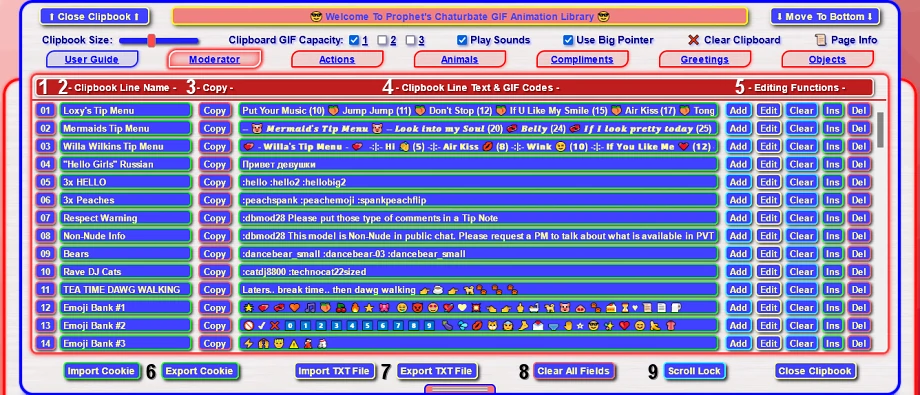
Clipbook Utility Functions:
1. Clipbook Line Number. This is for indication only.
2. Clipbook Line Name. You can give each Clipbook Line a name if you wish. Max length is 30 Chars.
3. [Copy] Button. Click this to copy the whole Clipbook Line Text to the computer clipboard.
4. Clipbook Line Text. This contains your GIF codes and Text that will be copied to the clipboard. Max is 1024 Chars.
5. Clipbook Editing Function Buttons:
[Add] will add any Text or GIF codes already in the Clipboard Indicator to the Clipbook Line Text Field.
[Edit] will open the Full Text Editor for the Clipbook Line Text Field. More about the Full Text Editor on down the page.
[Clear] will clear the Clipbook Line Name and Clipbook Line Text.
[Ins] will insert a new blank Clipbook line below this position. All Clipbook lines after this will move up one position.
[Del] will delete the Clipline. All Cliplines after this will move down one position.
6. Import / Export Cookie. Loads and Saves all the Clipbook contents to Browser Cookies.
7. Import / Export TXT File. Loads and Saves all the Clipbook contents to a TXT File.
8. Clear All. Clears the entire Clipbook. All the Clipbook Line Name and Clipbook Line Text fields will be blank.
9. Scroll Lock. Locks the Clipbook Line Utility list window at its current position.
Note:
The Name Field, Text Field and Full Text Editor windows respond to the regular Windows "Select All / Copy / Cut / Paste / Drag" functions as you would normally expect.
Special 2-Byte Extended Character Fonts:
Chaturbate will accept Extended Character and Emoji fonts in the Public Room and PM windows.
Examples of these fonts are in the screenshot in lines 02, and lines 10 thru 12. Please be aware that each character in these fonts uses 2 characters out of the 1024 available.
You can generate your own fancy font writing for the Clipbook by using the Instagram Fonts site at https://igfonts.io/
The Clipbook Utility has 80 Clipbook Lines. You can copy each Clipbook Line to the clipboard with one click.
This is useful if you need to paste a large block of pre-defined Text or GIF codes into the chat window.
Examples of this would be a Model's Tip Menu, a Model's Room conditions (non-nude etc), Multi-GIF messages, or generic warnings to room users about language / attitude etc.
The Clipbook Utility can also be used with any of the other camming platforms like MFC, Streamate, Stripchat, Bongacams etc.
A screenshot of the Clipbook Utility is shown below.
I have filled some of the lines with examples of what you can use it for.
The Clipbook Utility functions are numbered in the screenshot and explained below:
Clipbook Utility Functions:
1. Clipbook Line Number. This is for indication only.
2. Clipbook Line Name. You can give each Clipbook Line a name if you wish. Max length is 30 Chars.
3. [Copy] Button. Click this to copy the whole Clipbook Line Text to the computer clipboard.
4. Clipbook Line Text. This contains your GIF codes and Text that will be copied to the clipboard. Max is 1024 Chars.
5. Clipbook Editing Function Buttons:
[Add] will add any Text or GIF codes already in the Clipboard Indicator to the Clipbook Line Text Field.
[Edit] will open the Full Text Editor for the Clipbook Line Text Field. More about the Full Text Editor on down the page.
[Clear] will clear the Clipbook Line Name and Clipbook Line Text.
[Ins] will insert a new blank Clipbook line below this position. All Clipbook lines after this will move up one position.
[Del] will delete the Clipline. All Cliplines after this will move down one position.
6. Import / Export Cookie. Loads and Saves all the Clipbook contents to Browser Cookies.
7. Import / Export TXT File. Loads and Saves all the Clipbook contents to a TXT File.
8. Clear All. Clears the entire Clipbook. All the Clipbook Line Name and Clipbook Line Text fields will be blank.
9. Scroll Lock. Locks the Clipbook Line Utility list window at its current position.
Note:
The Name Field, Text Field and Full Text Editor windows respond to the regular Windows "Select All / Copy / Cut / Paste / Drag" functions as you would normally expect.
Special 2-Byte Extended Character Fonts:
Chaturbate will accept Extended Character and Emoji fonts in the Public Room and PM windows.
Examples of these fonts are in the screenshot in lines 02, and lines 10 thru 12. Please be aware that each character in these fonts uses 2 characters out of the 1024 available.
You can generate your own fancy font writing for the Clipbook by using the Instagram Fonts site at https://igfonts.io/
Full Text Editor
At the time of writing Chaturbate allows up to 1024 characters in a single line of chat text.
If you put a lot of text in the Clipline Text Field window then it may be too small to see all the text easily without having to scroll back and forward.
The Full Text Editor can be used so you can see all the text in a larger text field.
The screenshot below shows a large block of text and emojis in the CliplineText Field in Line 02.

When you click the [Edit] button the Full Text Editor will open and show all the text in the Text Field for Line 02
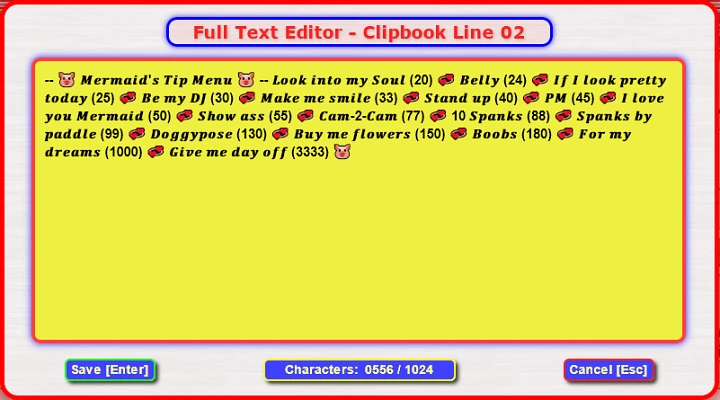
The Character Counter shows how many characters you have used from the 1024 available.
Be aware that any Extended Characters (e.g. Emojis) you have in the edit box may use 2 or more characters of the 1024 available.
The [ Save ] button will write all the text in the edit window back to the Clipbook Line Text Field.
The [ Cancel ] button will discard any changes you have made in the Full Text Editor.
At the time of writing Chaturbate allows up to 1024 characters in a single line of chat text.
If you put a lot of text in the Clipline Text Field window then it may be too small to see all the text easily without having to scroll back and forward.
The Full Text Editor can be used so you can see all the text in a larger text field.
The screenshot below shows a large block of text and emojis in the CliplineText Field in Line 02.
When you click the [Edit] button the Full Text Editor will open and show all the text in the Text Field for Line 02
The Character Counter shows how many characters you have used from the 1024 available.
Be aware that any Extended Characters (e.g. Emojis) you have in the edit box may use 2 or more characters of the 1024 available.
The [ Save ] button will write all the text in the edit window back to the Clipbook Line Text Field.
The [ Cancel ] button will discard any changes you have made in the Full Text Editor.
Import / Export Functions
👉 !! Important !! 👈
Please be aware that when you close the GIF Animation Library in your browser all the information in the Clipbook Name and Text Fields will be lost. The next time you visit the GIF Animation Library and open the Clipbook all the fields will be blank. To solve this problem you can use the Import & Export Functions.
Import / Export using Cookies:
The [ Export Cookie ] button will grab all the data in the Clipbook and write it to a Browser Cookie.
This Cookie will be valid for 365 days, or until you clear your Browser Cookies.
The [ Import Cookie ] button will pull all the data from the Cookie and write it back to the Clipbook.
Import / Export using TXT Files:
The [ Export TXT File ] button will download all the Clipbook Data and save it to a TXT file called CBGIFS_Clipbook
The filename will be appended with the Date and Time in the format YYYY-MM-DD _ hh-mm-ss.
For example the filename will look like this: CBGIFS_Clipbook - 2021-12-09 _ 13-36-53.txt
The [ Import TXT File ] button will open a file requestor and you can select a previously exported file.
The file contents will then be written back to the Clipbook.
Note: The Import TXT file routine will only overwrite the Clipbook with whatever quantity of data is in the TXT File.
For example if the TXT file only contains three Clip Lines then only the first three lines (01 - 03) in the Clipbook will be overwritten. All the remaining lines (04 - 80) will be unaffected.
PC Text Editor:
Using the Import / Export TXT functions allows you to create or edit your Clipbook data offline in your PC's Text Editor.
You may find this easier when you want to re-arrange or sort the Cliplines into model-specific blocks.
The Name Fields will be on the Odd numbered lines, and the Text Fields will be on the Even numbered lines.
For Windows users I highly recommend using Notepad ++ for your text editor. You can download it for free HERE.
👉 !! Important !! 👈
Please be aware that when you close the GIF Animation Library in your browser all the information in the Clipbook Name and Text Fields will be lost. The next time you visit the GIF Animation Library and open the Clipbook all the fields will be blank. To solve this problem you can use the Import & Export Functions.
Import / Export using Cookies:
The [ Export Cookie ] button will grab all the data in the Clipbook and write it to a Browser Cookie.
This Cookie will be valid for 365 days, or until you clear your Browser Cookies.
The [ Import Cookie ] button will pull all the data from the Cookie and write it back to the Clipbook.
Import / Export using TXT Files:
The [ Export TXT File ] button will download all the Clipbook Data and save it to a TXT file called CBGIFS_Clipbook
The filename will be appended with the Date and Time in the format YYYY-MM-DD _ hh-mm-ss.
For example the filename will look like this: CBGIFS_Clipbook - 2021-12-09 _ 13-36-53.txt
The [ Import TXT File ] button will open a file requestor and you can select a previously exported file.
The file contents will then be written back to the Clipbook.
Note: The Import TXT file routine will only overwrite the Clipbook with whatever quantity of data is in the TXT File.
For example if the TXT file only contains three Clip Lines then only the first three lines (01 - 03) in the Clipbook will be overwritten. All the remaining lines (04 - 80) will be unaffected.
PC Text Editor:
Using the Import / Export TXT functions allows you to create or edit your Clipbook data offline in your PC's Text Editor.
You may find this easier when you want to re-arrange or sort the Cliplines into model-specific blocks.
The Name Fields will be on the Odd numbered lines, and the Text Fields will be on the Even numbered lines.
For Windows users I highly recommend using Notepad ++ for your text editor. You can download it for free HERE.
And Finally..
This site is a project I do in my spare time as a labour-of-love. I am not affiliated with Chaturbate in any way.
All of the GIF images in the GIF Animation Library are non-nude in nature.
I consider all the uploaded GIF images that are used on Chaturbate as Public Domain.
If you are a GIF creator and wish to have your GIF(s) removed from the library please let me know.
To respect Cam Model Privacy NO Model-Specific GIF images are featured here.
If you find the GIF Animation Library useful please drop a donation into the Tip Jar.
You can do this by using the Send Tip button on my CB account at https://chaturbate.com/prophet_xi
The list of previous donations can be viewed on the Donations Page
😇 Many thanks for your kind support, every little helps! 😇
This site is a project I do in my spare time as a labour-of-love. I am not affiliated with Chaturbate in any way.
All of the GIF images in the GIF Animation Library are non-nude in nature.
I consider all the uploaded GIF images that are used on Chaturbate as Public Domain.
If you are a GIF creator and wish to have your GIF(s) removed from the library please let me know.
To respect Cam Model Privacy NO Model-Specific GIF images are featured here.
If you find the GIF Animation Library useful please drop a donation into the Tip Jar.
You can do this by using the Send Tip button on my CB account at https://chaturbate.com/prophet_xi
The list of previous donations can be viewed on the Donations Page
😇 Many thanks for your kind support, every little helps! 😇